Serverless GPUs for AI Inference and Training
 Eli Mernit
Serverless GPUs are a cloud service where you can run GPU-accelerated workloads without managing the underlying servers or keeping GPUs reserved. Instead of renting a full GPU instance by the hour (like on AWS EC2), you run code that automatically spins up a GPU container when needed, executes your job, and then spins it down. You pay only for the execution time, and you don’t need to manage the underlying infrastructure.
What are serverless GPUs used for?
You can think of serverless GPUs like AWS Lambda, but with GPU support: run your function, get cloud GPU-acceleration, and avoid paying for idle time. Serverless GPUs are especially useful for these use-cases:
- AI Inference: serving custom models as autoscaling HTTP endpoints, including LLMs, diffusion and deep learning models.
- Fine-Tuning AI Models: run fine-tuning jobs on custom datasets. Instead of provisioning a training cluster manually, you launch it serverlessly and let it disappear when done.
- Image and Video Workloads: running heavy jobs, like 3D rendering, video transcoding, and batch processing.
- Scientific Simulations: computational pipelines that require GPU parallelism, like protein folding and bioinformatics analysis
- CI/CD and Testing: spin up ephemeral GPU environments to test GPU-accelerated code as part of a build pipeline.
Top Serverless GPU Providers
Beam
GPU Support: T4, A10G, A100, H100, RTX 4090
Free Tier: pay-as-you-go; no subscription floor
Beam is an open-source serverless platform for GPU workloads. It specializes in fast cold boots, with containers starting in <1 second.
Beam’s fast cold-start is made possible by its open-source container runtime, beta9. Unlike other providers which are built on Docker, Beam runs a custom container runtime which lazy loads container images from a distributed cache.
In terms of developer experience, Beam provides a Python-native interface and a Python SDK. The entire process of building an app is Python; there are no YAML files or configuration required.
Pros:
- Fast cold starts for custom models
- Open-source and self-hosting options available
- Support for functions, task queues, container hosting, and long-running jobs, in addition to endpoints
Cons:
- Python-focused developer experience may be a deal-breaker for Typescript developers
RunPod
GPU Support: A4000, A6000, A100, H100, consumer RTX GPUs
Free Tier: No
RunPod is an on-demand GPU provider with a large catalog of machines, ranging from consumer cards to B200s. Deployments are Docker-based, which makes it easy to deploy existing containers with minimal refactoring to existing code. RunPod also supports storage volumes for caching model weights, and has a developer-friendly CLI for managing deployments.
Pros:
- Best pricing for GPU workloads
- Bring your own container
- Ability to mount storage volumes to cache model weights
Cons:
- Image builds can be slow, especially for large (>10Gi) images.
- RunPod provides a cold start optimization called Flashboot, but this only works for deployments with a lot of traffic - deployments with less traffic will still have longer cold starts
Modal
GPU Support: T4, A10G, A100, H100 (varies by region)
Free Tier: $30 per month
Modal is a serverless platform designed for Python developers. It provides a flexible SDK that lets you run arbitrary Python functions in the cloud and attach GPUs as needed. Unlike some competitors that focus mainly on model serving, Modal is broader. It supports inference, fine-tuning, training, and even general GPU-accelerated workflows like CI/CD. Developers define their workloads directly in Python code, which Modal packages and deploys into scalable serverless functions.
Pros:
- Supports arbitrary Python functions, rather than just model serving
- Good documentation and developer experience
- Generous monthly free tier
Cons:
- Self-hosting isn't possible for companies with strict compliance requirements
- More limited GPU options compared to RunPod
Baseten
GPU Support: T4, L4, A10G, A100, H100
Free Tier: Yes.
Baseten is a managed platform for deploying and scaling machine learning models. It offers a packaging system called Truss, and automatically scales out your code to multiple GPUs on-demand. Baseten supports multiple GPU types, including MIG instances.
Pros:
- Built-in autoscaling with support for task queues and async jobs
- Easy model packaging with Truss
Cons:
- Slower cold starts
- Billing is per-minute and less granular than other per-second options
Replicate
GPU Support: T4, A100, H100
Free Tier: Yes, but only for public models
Replicate is a model hosting platform with a large public library of pre-trained models for tasks like image generation and transcription. Public models load instantly, while custom models run in private containers with longer cold starts. Replicate provides an open-source packaging system, called Cog, to package models for production on Replicate.
Pros:
- Large library of pre-built models APIs
- Easy to test models using the web interface
Cons:
- Long cold starts for private models
- Idle time is billed on custom deployments
Addressing Cold Boot Latency
Cold start latency occurs when models need to be initially loaded before providing inference services, causing slow loading times and potentially affecting model performance and user experience.
Pre-Loading Model Weights
The first optimization to minimize cold boot latency is achieved by pre-loading models when the model container first starts.
This prevents the model from having to be retrieved each time the API is invoked. We provide example code for this strategy below:
Caching Weights in Distributed Storage
One of the slowest operations in machine learning inference is downloading large model weights from the internet. We advise against downloading model weights from cloud object storage; it's way too slow. Instead, we suggest mounting files directly to the container running inference:
Enabling GPU Checkpoint Restore
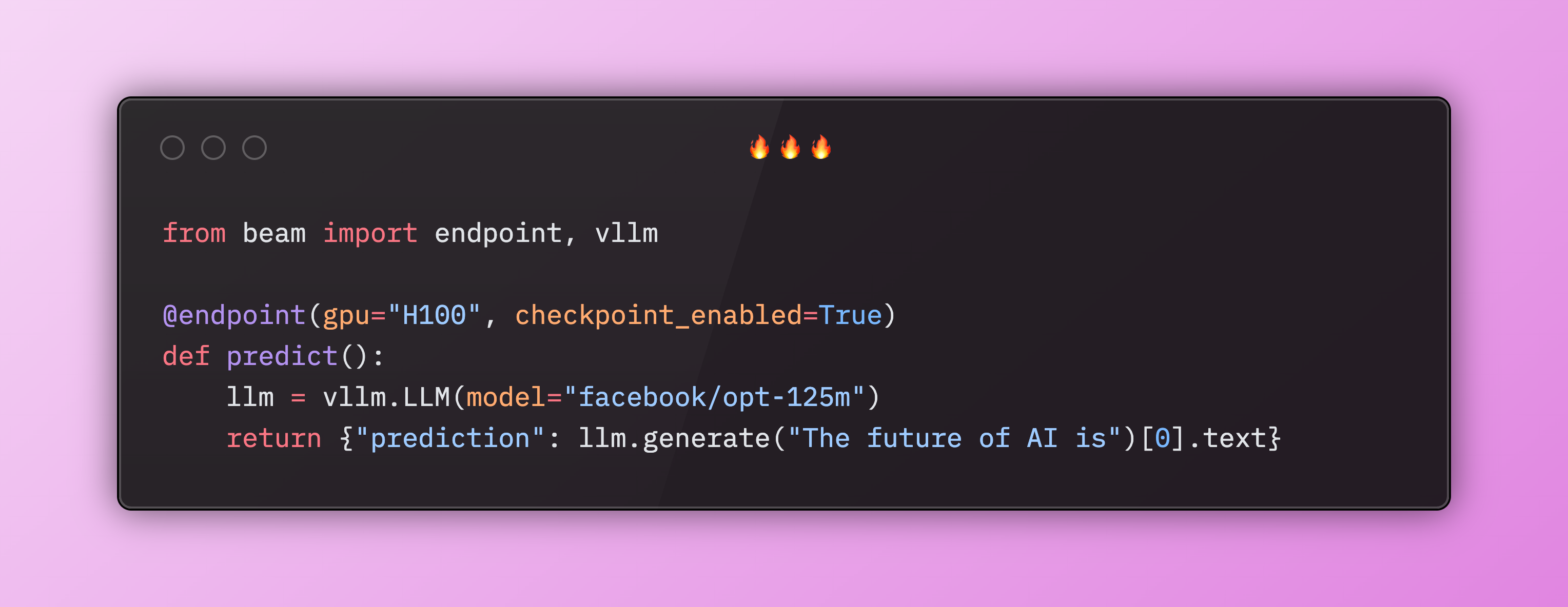
Checkpoint Restore is a modern technique to save a snapshot, or checkpoint, of a GPU process in order to avoid having to model weights back into memory each cold boot. Beam and Modal both offer this as of August 2025, and it's a simple parameter which can be added to an existing deployment:
FAQs
Are serverless GPUs cheaper than EC2?
For bursty workloads, serverless GPUs are significantly cheaper than using on-demand EC2 instances. When using EC2, you pay for the full GPU instance by the hour, regardless if it's running code or sitting idle. With serverless GPUs, you only pay when your code is running.
Can I train LLMs on serverless GPUs?
You can train LLMs on serverless GPUs. It's often difficult and expensive to access a large machine, like an H100, on conventional on-demand cloud providers. Many serverless GPU providers offer H100s, but also allow you to access multiple GPUs per workload.
What’s the difference between serverless GPUs and spot GPUs?
Spot instances are hourly rentals that are interruptible, which means the cloud provider can decide to stop your workload if the instance is needed by another customer. Unlike spot instances, serverless GPUs are billed by the second, and are typically not interruptible.
How do you reduce serverless GPU cold starts?
There are several strategies:
- Optimize your container image to exclude unnecessary packages so there's less to load at runtime
- Pre-load model weights at start time so they’re loaded into VRAM before the first request
- Store models weights in distributed storage volumes instead of downloading them from remote object storage
- Some platforms support checkpoint restore, which saves a snapshot of the GPU memory and prevents the need to re-load weights into VRAM each time the container boots
Conclusion
Serverless GPUs make it easy to run expensive jobs on the cloud without the hassle of requesting GPU quotas or managing infrastructure. This said, it's important to factor cost and cold boot times into your decision to use serverless GPUs instead of dedicated instances. If your jobs have a consistent amount of traffic, it may make more sense to use conventional on-demand instances instead.