The Best OCR Models in 2025
 Leah Childers
The history of optical character recognition (OCR) spans over a century, beginning with Emanuel Goldberg in 1914 who developed a machine that read characters and converted them into telegraph code. OCR developed alongside other technology, seeing digitization with the rise of computerized systems.
One revolutionary application of OCR advancements was the 1976 Kurzweil Reading Machine, the first device of its kind, which scanned documents into text, then read the text with text-to-speech (TTS) technology. In addition to accessibility, OCR tools have had a huge impact on automation within many modern industries, including data and documentation, banking and finance, and logistics.
In this article, many use cases of different OCR tools will be discussed, and at the end, the strengths of various models will be showcased through examples.
"Traditional" OCR
Traditional OCR (non-deep-learning) relies on the manual engineering of rule-based algorithms to extract features such as edges, strokes, and intersections. These systems classify with direct pattern matching or statistical methods such as Hidden Markov Models and k-nearest neighbors.
Similar to text generation and text-to-speech technology, there exist both these older methods and models which tend to run well in resource-limited environments as well as newer, deep-learning models which are substantially more accurate and flexible than traditional options, but may require more computation power or be more expensive to run.
Modern Deep Learning OCR
Traditional OCR systems may take on the order of minutes to segment even small images with fewer than 100 words. On the other hand, deep-learning options often have fairly quick or near-instant inference time with long and resource-intensive training or fine-tuning.
Neural networks are good at automatically learning features from images in a way that rule-based algorithms are typically not flexible enough to do. The most commonly used deep-learning OCR models are CNNs, RNNs (LSTMs), and Transformers due to their ability to understand spatial and sequential relationships.
Best OCR Options by Use Case
If you are looking for good general, flexible models for use in various situations without trying to specialize, LLM chatbots such as ChatGPT, Claude, Perplexity, and Gemini are all solid options.
- Availability:
- Offered as free/paid commercial LLM chatbots/API
- Strengths:
- Good general and flexible models for a variety of situations.
- Possess multimodal capabilities.
- Accuracy is typically pretty good.
- Very easy for occasional use.
- Limitations:
- Can be slow depending on reasoning needs and text length.
- API options may be expensive and not as efficient for developers.
- Some of the API offerings do not include the multimodal capabilities and are only available via the chatbot UI.
For specialized use, there are many specialized models that are trained on much narrower sets of data, or can be fine-tuned, and can be significantly more resource-efficient.
We discuss some of these models below.
Handwriting (Not Math-Focused)
Handwritten text is still one of the toughest challenges for OCR, even in 2025. Deep-learning models have vastly improved the performance of OCR systems on consistent handwriting, even with messy handwriting or extra noise, but stylized handwriting such as cursive, writing contained in historical documents, and math equations can still be difficult. Here are the current best options for different types of handwriting that don't include math.
Neat, modern handwriting:
There are many good options for neat, modern handwriting. As mentioned earlier, LLM chatbots and their APIs are very good for generalized use, handwriting included.
For end-users seeking other options, Apple (Live Text) and Google (Lens) each offer free tools that work fairly well on neat handwriting and have convenient mobile apps.
For developers seeking more systematic tools, a good choice is HandwritingOCR:
- Availability:
- Paid, commercial, subscriptions and pay-as-you-go plans
- Web interface and an API
- Strengths:
- Allows for structured data extraction (such as exporting to Excel)
- Optimized specifically for handwritten forms and notes
Older manuscripts and other special use cases:
For messy handwriting and noisy images, OCR tools within LLMs can work pretty well too, although performance can depend on the text prompt, which can interfere with consistency.
For historical documents, the best option is Transkribus:
- Availability:
- Commercial with both free and paid options.
- Offers a generous free tier as well as paid tiers aimed primarily at researchers.
- Strengths:
- Widely regarded as the go-to platform for historical documents
- Comes with pretrained models for specific time periods and script types
- Can custom train it on a specific dataset
Printed Documents/PDFs
This section will focus on PDFs whose main content is printed or digital text. There are two typical possibilities for these PDFs.
- The text may already be included in a content stream and embedded directly into the file if it was exported from known text editor formats such as Word or LaTex. Then the text can be extracted simply by highlighting and copying or with any other PDF text parsing tool (no OCR needed). In these formats, other content such as images and tables may also be embedded, but depending on the source, some text contained in them may not be embedded or extractable.
- When PDFs are generated from scanning documents, converted from images, or include content such as figures that may not have extracted text, OCR tools can be applied.
For case 2 where all or some of the text is not embedded, there are many solid commercial and open source options to choose from, including:
Adobe Acrobat OCR:
- Availability:
- Commercial, paid
- Strengths:
- Can be convenient because Acrobat is the default PDF viewer on many devices.
- Easy to use, enterprise‑ready, consistent, and stable.
- Primarily designed for printed text, making it great for scanned print documents.
- Limitations:
- Less flexible and customizable than open source options
- Struggles with handwriting
- Almost all of the resources require logging in to view, including all documentation and pricing.
- Availability:
- Open source
- Primarily operated via the command line (CLI); some GUIs exist.
- Strengths:
- Excellent performance with printed and digital text.
- Well‑suited for backend/automation tasks.
- Developed by Hewlett-Packard then released as open-source in 2005, continues to be improved and maintained in modern deep-learning frameworks.
- Limitations:
- While Tesseract continues to be improved, it is no longer state-of-the-art for accuracy
Handwritten Math and LaTex
Commonly regarded as the leader for math OCR is Mathpix:
- Availability:
- Commercial, paid (with a fee-to-use demo)
- Available with a well‑documented API as well as via browser, desktop, and mobile apps
- Strengths:
- Extraordinarily fast (near-instant for snippets of less than a page)
- Designed specifically to convert images of math into proper LaTeX source code
- Can handle both (neat) handwriting and printed text
- As a highly specialized model, it’s typically cheaper to use than general models.
- Limitations:
- When processing text mixed with prose, it may assume everything is math, resulting in weird math notation.
Translating and Multilingual Use
If a project requires not just extracting text, but understanding it for translation, there are many commercial and open source options developed specifically for the added challenges of multilingual use. Here are some of the top picks:
Google Lens and Google Translate:
- Availability:
- Free, mobile/desktop app, browser use, (paid) API integrated in Google's Cloud services.
- For developers, Google Cloud Translation API allows one to access, customize, and train the translator models (there are many) and either pay a subscription or pay-as-you-go.
- Languages supported: 249 languages (as of 4/13/25)
- Strengths:
- Great for real-time translation of printed text and some handwriting.
- A clear leader for translation tasks for end‑users.
- Note: Machine translating has a history dating back over 75 years, however Google Translate marked a huge leap forward in public access and quality of translation, offering many more languages than earlier machine translators. Given Google Translate's fame over the past decade and Google's large collection of API tools, it's no surprise Google is still a top option for any task that involves translation.
Tesseract OCR:
- As mentioned earlier, Tesseract is open source and excels at printed text.
- Languages supported: 100+ languages
- Limitations in multilingual use:
- Tesseract does not translate text, it only extracts it.
- Strengths in multilingual use:
- Pairing the text extraction of Tesseract with Google Translate can decrease expenses
- Availability:
- Open source, currently rising in popularity
- Languages supported:
- Supports over 80 pre-trained languages, and
- Excels particularly at Chinese and other Asian languages
- Strengths:
- Often outperforms Tesseract on both printed and handwritten tasks
- Fast and lightweight
- Limitations:
- Does not translate text, only extracts it
- Availability:
- Commercial, paid (with a free trial available)
- Aimed primarily at enterprise use.
- ABBYY also advertises an OCR SDK for developers, however as of 4/6/25, access appears limited, and attempting to view the API documentation requires joining their waitlist.
- Languages supported: Supports around 200 languages
- Strengths:
- Accurate and stable
- A top‑performer regarding accuracy of multilingual texts
- Limitations:
- May be too expensive for resource‑limited projects
- Does not translate text, only extracts it
Real-time OCR
Real-time OCR involves extracting text on the fly to use immediately use the result, such as live translating, quick credit card and form scanning, or in accessibility technology.
For end-users, Google and Apple offer free, high-quality mobile apps. Microsoft Seeing AI (commercial, free) is also a great solution for real-time OCR designed specifically for accessibility.
For developers, Google is once again one of the leaders with Google's ML Kit Text Recognition:
- Availability:
- Commercial, free
- Integrated into Google’s many API offerings
- Languages supported:
- Can recognize text in scripts including Latin, Chinese, Devanagari, Japanese, and Korean
- Strengths:
- Optimized specifically for speed by working offline
- Leader for real-time OCR, already used in many third-party scanning apps
- Can handle printed text and some handwriting
- Limitations:
- Not as accurate for broader language support or other difficult use cases compared to Google’s Cloud OCR options
When Accuracy is the Highest Priority
When the objective is high accuracy, consistency, and stability, and a project can sacrifice speed or cost, there are many out-of-box commercial options, such as ABBYY FineReader (mentioned earlier), Google Cloud OCR, Amazon Textract, and Microsoft Azure OCR:
- Availability:
- Commercial, paid, with varying levels of free trials
- Strengths:
- Offer high accuracy, consistency, and stability; perfect for projects requiring high-quality OCR or enterprise-ready software
- Well‑polished, well‑documented, and integrated nicely into their respective ecosystems
- Limitations:
- Can be expensive for resource-limited projects
Examples of Different Options
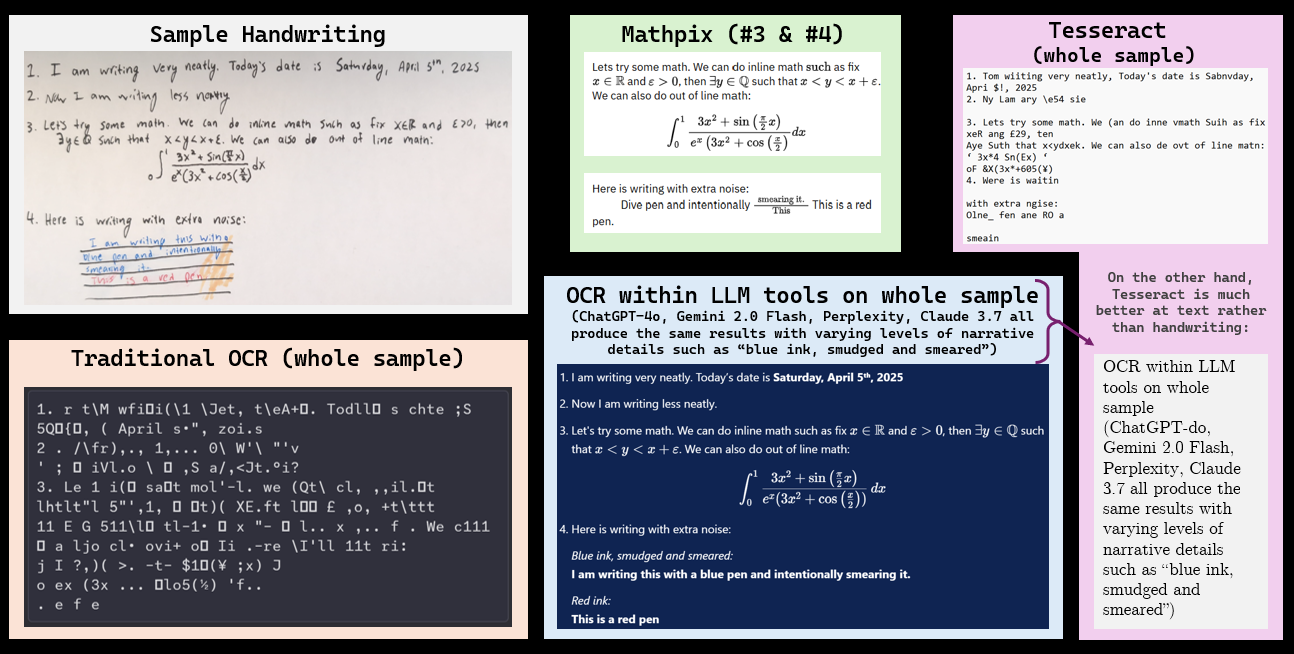
Here are example uses of many of the tools discussed here.
- Sample: The handwriting sample includes some fairly easy handwriting to recognize to showcase strengths of different models.
- Traditional OCR: Finding still-available OCR systems that don't use deep learning is difficult. This is the output from an old (unfortunately unknown) version of Adobe Acrobat trying to read the image. Older OCR systems are best at single-font writing and, as shown here, not very good at handwriting.
- Mathpix: As discussed, Mathpix is widely recognized as the leading solution for OCR'ing math and scientific content, however as one can see from this example, one of its weaknesses is assuming that everything is math. Mathpix is highly specialized, so sometimes other tools are needed for the non-math parts.
- OCR inside LLM chatbots: These options are very generalized and, while they can be slow, they are a very easy-to-use and simple solution to many OCR needs.
- Tesseract: As noted earlier, Tesseract excels with printed/digital text but struggles with handwriting.
Takeaways
There are many high-performing options for all different optical character recognition use cases. For accuracy and consistency, commercial enterprise software is a good choice. For historical documents and math, there are state of the art specialized models acclaimed by both users and developers. For developer use and integration into other projects, there are many open source and commercial options, including the option of chaining together open source and commercial software to optimize performance while minimizing costs.